Twoje komentarze

Hi Adam,
Thanks for the contribution!
Regarding your question: Yes, exactly. In the bibtex file you upload (and which you can later edit directly on bibbase), you can include url fields that point to files you've also uploaded. You can specify absolute URLs in those fields, or, for convenience, you can also just list the filename, in which case they will resolve to URLs on the same host and same sub-path as the bib file itself.
For example, if I have these files in my file manager on BibBase:
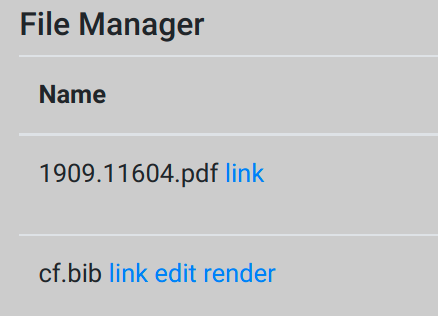
and the cf.bib file contains an entry with the field:
url = {1909.11604.pdf}
then when I render that bib file it will resolve that filename to the file in my account.
Yes, confirmed, I saw that comment. We haven't yet found the time to investigate it more so I can't, at this point, make any promises. There are a number of issues that rank higher in priority right now, either because they are required by premium users, or because they affect more users. So I can't quite tell how long it will be until we get to it. If using straight-out bibtex files, hosted either on your own server, on github, or directly on bibbase, then I highly recommend that. They are best supported and give you the greatest level of control.
Hi Adam,
Awesome, thanks in advance for the shout on Twitter! In terms of donating: no, we don't have a mechanism for that, but you can sign up for one of our premium plans instead if you want. They start at $4/month and you can cancel any time.
Hi Adam,
Yes, that makes sense. Regarding the "-1" suffix: Zotero seems to be using different algorithms when exporting to users via the UI and to other services via their API, because the bibtex we receive from them does not have those suffixes. However, it was easy for us to add that feature on our end as well, so we just did. Personally I don't see much of a reason to enforce the uniqueness of bibtex entry keys and it doesn't break anything.
Your page now shows all 689 publications.
Hope that helps! If you like BibBase and want to help us, please consider giving us a shout out on Twitter: https://twitter.com/bibbase.
Thanks,
Christian
Hi Adam,
This took me a while to figure out, but eventually I realized that at least in part this seems to be due to duplicate entry keys in the bibtex:
> grep @ 4501563.bib  | sort | uniq -c | sort -nr | head -n 20
      2 @unpublished{piketty_long-run_2010,
      2 @unpublished{pellegrini_what_2016,
      2 @techreport{noauthor_global_2015,
      2 @techreport{noauthor_global_2014,
      2 @techreport{noauthor_global_2013,
      2 @techreport{noauthor_global_2012,
      2 @techreport{noauthor_global_2011,
      2 @techreport{noauthor_global_2010,
      2 @misc{noauthor_oecd_nodate,
      2 @misc{noauthor_new_2020-1,
      2 @misc{noauthor_new_2020,
      2 @article{saez_wealth_2016,
      2 @article{piketty_income_2003,
      1 @unpublished{zucman_missing_2013,
      1 @unpublished{zoutman_effect_2014,
      1 @unpublished{xavier_wealth_2020,
      1 @unpublished{wolff_household_2021,
      1 @unpublished{wolff_household_2017,
      1 @unpublished{waltl_multidimensional_2020,
      1 @unpublished{waldenstrom_national_2015,
Dear Benjamin,
Thanks for reporting this. The issue is (or was) that our new link uses the same CSS class name, "page", as already used by other elements on your page, with styling already applied. This is the style your page added to the "page" class:
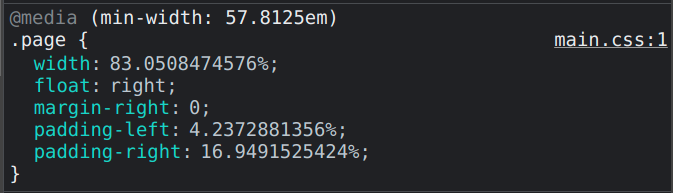
This style was now also applied to the new links added by BibBase and that's what caused the layout issue.
Seeing your case made us realize that "page" is probably too generic of a class name for us to use, especially when we really mean "the bibbase page". So we've gone ahead and changed our class name to "bibbase_page" now. This fixes the layout issue you saw on your page.
Thanks again for reporting!
Best,
Christian

This is already supported when just leaving groupby blank:
https://bibbase.org/show?bib=https://bibbase.org/bibs/knuth_selected.bib&groupby=&hidemenu=true
It's recommended to use that with the sort option. See "Customization options" in the documentation for more details.
Hi Pascal,
Thanks for following up on this! By now we actually support this. It's actually one of the most popular features of our group plans. In those plans, all users in your organization have their own data sources that they can maintain in whichever way they like -- bibtex file directly on BibBase, a URL to a bibtex file hosted elsewhere, Zotero, Mendeley, DBLP. All those sources are merged, with deduplication, at query time when a query for the organization's publications are made.

Could you point me to your site? Then I can have a look. I definitely think you are on the right track though, of adding more CSS that defined font-sizes for the currently unstyled items. The reason you can't find any mentioning of font-size for the titles is because our theme specifically doesn't want to overwrite the style suggested by the surrounding web page. This is so that it is consistent with the rest of the page. Usually this is a benefit, but it sounds like your page defined certain styles that don't make much sense. I've be curious to take a look and see why, but in the end the solution will almost certainly look something like:
.bibbase_paper {
    font-size: 14px;
}
Or something like that.
By the way, if you are interested in more examples: all our themes have their own CSS file, e.g., https://bibbase.org/css/styles/dividers.css, and there is also a shared one that is common to all unless explicitly disabled: https://bibbase.org/css/styles/common.css .
Customer support service by UserEcho


Hi Adam,
Thanks for the elaborate message and attempts to debug. This helped me diagnose this pretty quickly.
Regarding the linked PDFs: You've found a bug! The issue was that we weren't yet handling filenames with spaces and special characters correctly in this context. This is fixed now and I've verified that the two papers you mentioned now download fine from the link on the page.
Regarding the per-publication pages on BibBase: yes, you are right. We deduplicate papers by their authors, title, and year and the database keeps getting updated by the last paper our servers saw with that combination. So while your other, Mendeley-based page is still live and being visited by people browsing the web, our database record for the paper keeps getting written by that old version. Once that page is removed from the web, or otherwise made inaccessible to people, the new page you are creating will be the one setting that record.
However, I recognize that this can be frustrating in some situations, like in your current migration. So we've just added a new option "noIndex=1" that you can use in the bibbase URL of your old (Mendeley-based) page to prevent it's data from being used to update the database.
Christian