Twoje komentarze


Thanks! I took a look and found the issue in the developer console of the browser. There it says the following when clicking the link:
Refused to display 'https://unca-my.sharepoint.com/personal/imuntean_unca_edu/_layouts/15/onedrive.aspx?id=%2Fpersonal%2Fimuntean%5Fu....' in a frame because it set 'X-Frame-Options' to 'sameorigin'.
This means that sharepoint.com disallows being shown in an iframe (more details on that feature here:
https://developer.mozilla.org/en-US/docs/Web/HTTP/Headers/X-Frame-Options).
But I liked your suggestion of controlling where links are being opened. That's indeed possible in HTML and easy, too. So I've just implemented a minor patch to BibBase that will always open links in the parent frame. The patch is already rolled out and your page seems to behave as expected now.
Also, if I may use the opportunity to ask you a question: if BibBase were to offer hosted pages much like Wordpress but with additional features that are specific to scientists' needs, could that be of interest to you? The features would, of course, include the publication rendering and also templates that are tailored to scientific web pages. Is that something you could justify spending $5/month on? Or are there any other premium features you would like to see, e.g., merging multiple data sources with duplicate detection (e.g., pulling in your DBLP result https://bibbase.org/show?msg=embed&bib=https://dblp.org/pid/229/8799.bib), or something else that can save you time or improve your web presence?
Thanks!
Hi Ioan,
Could you send me a link to the page? Then I'll take a look.
Thanks!
Hi Till,
We finally got around implementing this. Thanks for doing the leg-work of checking how bibtex and biblatex handle it. We followed your suggest and now support explicit strings as well as the predefined types bathesis and mathesis. Like you suggested we added @thesis as an alias for @mastersthesis. Your page looks good now I think, but please let me know if you find any issues.
Thanks.

Hi Ariane,
You can get rid of that message by removing "&msg=embed" from the URL you use in the script tag you inserted into your HTML. I'm not sure where you got the URL that includes that parameter, but it's not included in the snippets that are suggested by it. In any event, once you remove that parameter from the URL the message should disappear.
Indeed the max-height property is being overridden by some other CSS on your page. In this screenshot see how max-height in "img.bibbase_icon" is crossed out. There are several rules with higher priority (above in the list) that set a different value.
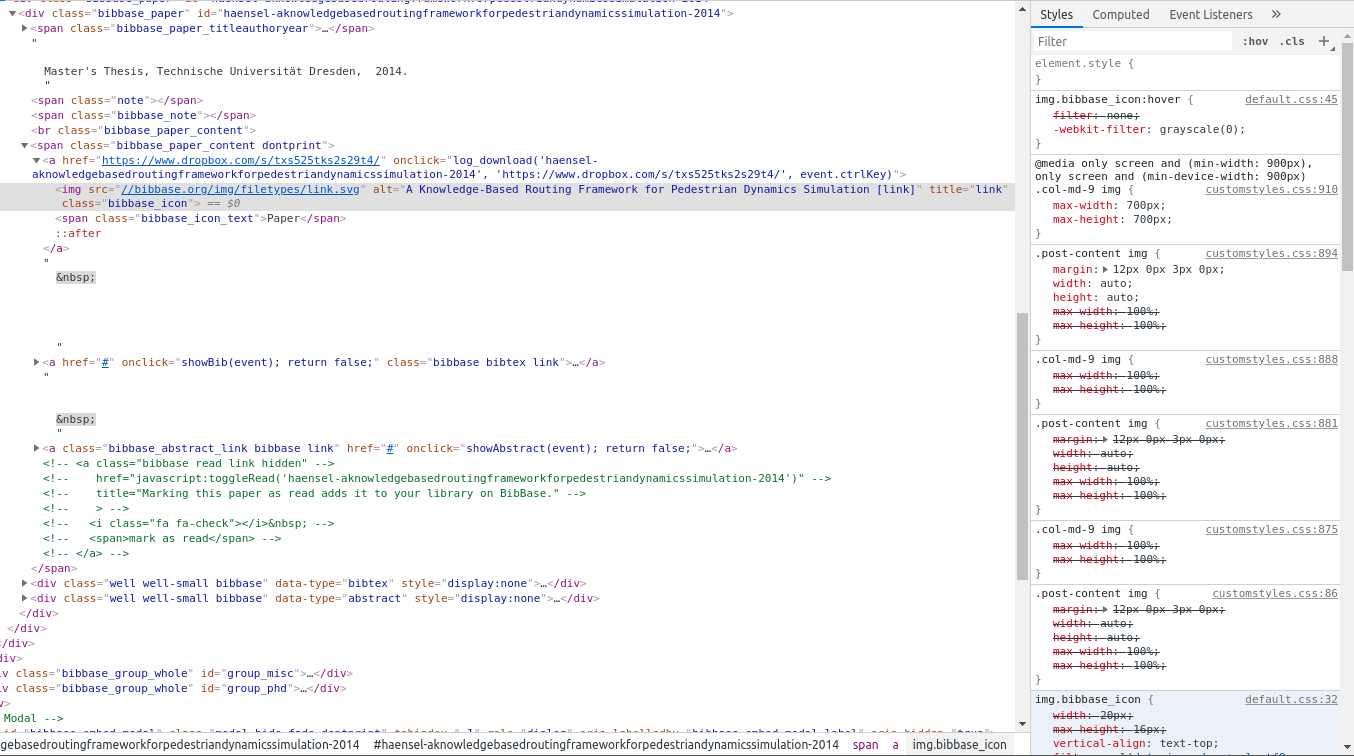
The easiest fix for you would be to add:
img.bibbase_icon {
  max-height: 16px !important;
}
to your CSS.
What you are seeing is certainly not the default behavior. The default theme loads this CSS, which sets the size of the icon:
img.bibbase_icon {
      width: 20px;
      max-height: 16px;
      vertical-align: text-top;
      filter: url("data:image/svg+xml;utf8,#grayscale"); /* Firefox 3.5+ */
      filter: grayscale(100%); /* Current draft standard */
      -webkit-filter: grayscale(100%); /* New WebKit */
      -moz-filter: grayscale(100%);
      -ms-filter: grayscale(100%);
      -o-filter: grayscale(100%);
      filter: gray; /* IE6+ */
}
I assume either your browser didn't load that for some reason, or you have CSS defined on your page that interferes with this. That said, when I open your link it looks fine:

Hi German,
Sorry for the late response. The articles within each group (e.g., a year), are kept in the order they appear in the source. This is ideal for bibtex where one can manually decide on the order. But for Mendeley this becomes unpredictable in general.
We have just added a new (but highly requested) feature that lets you overcome this. You can now add a "sort" option to the bibbase URL you use. Please see the updated options section on the help page for details. In your case, if your months are all numerical values, then you can add "&sort=month" to your bibbase URL to sort articles within a group in ascending order.
While we haven't quite implemented the feature you are asking about (sorting groups), we did just add a new option to control the sorting of publications within each group. Please see the "sort" option on the updated help page.
Customer support service by UserEcho


Dominik,
Thank you so much for reporting this embarrassing bug! It was indeed introduced just recently. It is fixed now.
Best,
Christian